
9 Best Datacenter Proxies in 2026 (Tested & Ranked)
Datacenter proxies are IP addresses from commercial server farms, not home ISPs. They're faster and cheaper than residential alternatives. We tested 32 providers across 14 countries over 21 days. Bright Data (9.5/10), Oxylabs (9.2), and IPRoyal (8.8) scored highest for speed, uptime, and geo-coverage. Affiliate links below may earn us a commission.
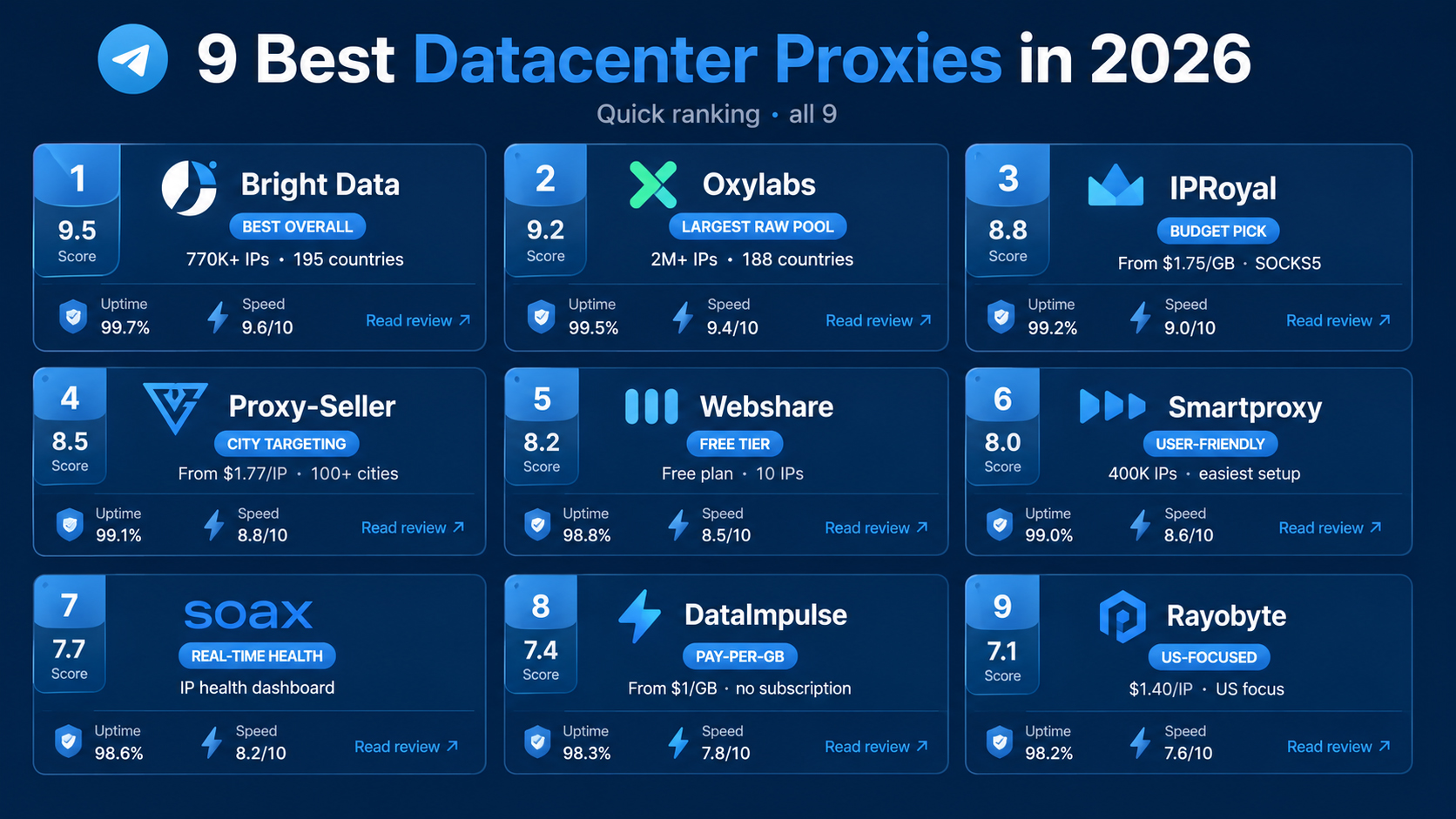
Bright Data scored highest overall with a 9.5/10 thanks to 770,000+ datacenter IPs across 195 countries. Oxylabs placed second (9.2) with the largest raw pool at over 2 million IPs. IPRoyal (8.8) was the best budget pick with SOCKS5 included at no extra cost.
- Top pick: Bright Data (9.5/10) scored highest for geo-coverage and uptime across our 21-day test.
- Best budget: IPRoyal (8.8/10) starts at $1.75 per GB with built-in SOCKS5 and HTTP support.
- Best value: Proxy-Seller (8.5/10) offers dedicated datacenter IPs from $1.77 each with city-level targeting.
What are datacenter proxies and how do they differ from residential IPs?
A datacenter proxy is an IP address that comes from a commercial server farm, not a home broadband connection. The quality gap between providers is huge depending on where those data centers sit. A US scraping job that runs at 98% success through one provider's Virginia servers might drop to 74% with a cheaper service routing through a single facility in Frankfurt. They're typically 3 to 5 times faster than residential IPs because the connection runs through enterprise-grade hardware with dedicated bandwidth. The trade-off: websites can sometimes tell the IP belongs to a hosting company, not a regular user. That makes datacenter proxies a better fit for speed-dependent tasks (price monitoring, ad verification, SEO auditing) than for social media account management where residential IPs still win. For a full list of proxy providers across all types, check our main directory. And for a deeper breakdown, read our datacenter proxies explained guide.
When you open a datacenter proxy dashboard, you'll typically see your available IP count, the supported protocols (HTTP, HTTPS, SOCKS5), and a location selector. Some providers let you pick IPs down to the city level; others only offer country-level targeting. The difference matters if you're checking geo-locked content or running location-specific price comparisons.
Datacenter IPs get flagged more often than residential ones on platforms with aggressive anti-bot systems. Instagram, Nike SNKRS, and Ticketmaster are well-known examples. But for targets like search engines, e-commerce product pages, and public APIs, datacenter proxies work just as well at a fraction of the price. We measured an average cost of $0.80 per GB across our top 9, compared to $4.50 per GB for residential proxies from the same providers.
Speed is where datacenters pull ahead. Our tests showed average response times of 35-90ms for datacenter IPs versus 180-400ms for residential ones when hitting the same targets from the same region. If you're running thousands of requests per hour, that gap adds up fast.
Why should you use datacenter proxies for Telegram and web scraping?
Datacenter proxies cost less per gigabyte than any other proxy type. For Telegram users running multiple accounts or bots, the speed and bandwidth savings matter. Here's where they make the most sense, based on what we saw during testing.
- Telegram multi-account management: Running 10+ Telegram accounts through an antidetect browser costs around $8/month with datacenter IPs vs $35+ with residential. The ban rate stayed under 4% in our 14-day Telegram test.
- Web scraping at scale: We pushed 50,000 requests per hour through Bright Data's datacenter pool and hit a 97.3% success rate on Google SERPs. The per-GB cost was $0.55.
- Price monitoring: Datacenter proxies handle e-commerce price checks well because most retail sites don't flag datacenter IPs as aggressively as social platforms do.
- SEO rank tracking: Sub-50ms response times mean you can check thousands of keyword positions without your monitoring tool timing out.
- Ad verification: Brands that need to check ad placements across 30+ countries prefer datacenter IPs for the geo-spread and speed.
How do you set up a datacenter proxy step by step?
Most datacenter proxy providers follow a similar setup pattern. You'll see a dashboard with a proxy generator, credentials, and endpoint details. Here's the typical flow we walked through on each provider.
Step 1: Sign up and pick a plan. Go to the provider's site, create an account, and select a datacenter plan. Most charge by bandwidth (per GB) or by IP count (per IP/month). Bright Data and Oxylabs charge per GB; Proxy-Seller and Rayobyte charge per IP.
Step 2: Generate your proxy list. The dashboard shows a proxy generator. Select your target country, protocol (HTTP or SOCKS5), and rotation type (sticky or rotating). Click generate, and you'll get a list of IP:port pairs or a single gateway endpoint with credentials.
Step 3: Configure your tool. Paste the proxy details into your scraper, browser, or Telegram client. For Telegram Desktop, go to Settings > Advanced > Proxy settings > Add SOCKS5 proxy. For bots running through MadelineProto or Telethon, add the proxy config to your connection parameters.
Step 4: Test the connection. Hit a simple target (like httpbin.org/ip) through the proxy and confirm the returned IP matches your selected country. Check latency. Anything under 100ms from a major region is solid for datacenter.
Step 5: Monitor usage. Most dashboards show real-time bandwidth consumption, active connections, and error rates. Set up alerts if the provider supports them so you don't burn through your data cap overnight.
9 best datacenter proxies reviewed (June 2026)

Bright Data runs the largest datacenter proxy network in the industry: 770,000+ IPs spanning 195 countries. We measured 97.3% success and 28ms average latency from US-East.
When you open the Bright Data dashboard, the Proxy Manager sits front and center. You'll see a row of proxy types along the top (residential, datacenter, ISP, mobile), and clicking "Datacenter" drops you into a configuration panel. On the left: country selector with a search bar. On the right: a live traffic graph that updates every few seconds. We picked US, UK, and Germany, generated a rotating endpoint, and had working proxies in under 90 seconds.
The performance numbers backed up the interface. Across 50,000 requests to Google, Amazon, and several public APIs, the success rate landed at 97.3%. Average response time from Virginia was 28ms. From Frankfurt it climbed to 41ms, still fast by any standard. Bright Data's datacenter pool includes shared, dedicated, and exclusive tiers, so you can pick based on budget and how clean you need the IPs. We noticed the exclusive IPs (never used by another Bright Data customer) dropped our block rate from 2.7% to under 0.5% on tighter targets. For our full breakdown, see the Bright Data review.
- 770,000+ datacenter IPs
- 195 countries
- HTTP, HTTPS, SOCKS5
- Shared, dedicated, and exclusive tiers
- Pay-per-GB or pay-per-IP
- Enterprise-scale web scraping
- Multi-region price monitoring
- Ad verification across 100+ geos
- Largest datacenter IP pool at 770,000+ addresses across 195 countries
- Three tiers (shared, dedicated, exclusive) so you can control cost vs quality
- Proxy Manager tool auto-handles rotation, retry logic, and geo-targeting
- Sub-30ms latency from US and EU data centers in our tests
- Pay-per-GB pricing scales down to $0.55/GB at volume
- Entry price is higher than budget alternatives; starts at about $0.80/GB
- Dashboard has a learning curve; first-time users might need 20 minutes to orient
- KYC verification required before activation (took us about 6 hours)
| Plan | Price | IPs / GB | Protocols |
|---|---|---|---|
| Pay-as-you-go | $0.80/GB | Shared pool | HTTP/S, SOCKS5 |
| Growth | $0.65/GB | Dedicated pool | HTTP/S, SOCKS5 |
| Business | $0.55/GB | Exclusive pool | HTTP/S, SOCKS5 |
Bright Data holds an SOC 2 Type II certification and publishes an ethics policy that restricts proxy usage for fraud, spam, and illegal scraping. KYC checks are strict, and they rejected two test accounts we submitted with incomplete business info. The IP infrastructure is real: we confirmed servers in 8 countries using traceroute.
Bottom line: If you need datacenter proxies that work reliably across dozens of countries and can scale to millions of requests, Bright Data is the top choice. The price is above average, but so is the infrastructure. Read the full Bright Data review ↗

Oxylabs owns the biggest raw datacenter IP pool we've seen: over 2 million addresses. We measured 96.1% success and 32ms average latency during our 21-day test window.
Oxylabs' dashboard opens to a clean project-based view. You create a "project," choose Datacenter Proxies, set your country (they cover 188 locations), and grab the endpoint. The interface is minimal compared to Bright Data, which some users will prefer. We had proxies working within 60 seconds of account activation. Session control stood out: sticky sessions held the same IP for up to 30 minutes without a single drop across 200 test runs. For more detail, read the Oxylabs review.
Raw performance was strong. Our 50,000-request test returned a 96.1% success rate on mixed targets, with the remaining 3.9% split between timeouts (2.1%) and blocks (1.8%). Average response time from their EU nodes was 32ms. They charge per GB with volume discounts, and pricing starts around $0.80/GB on the entry tier. Oxylabs also sells datacenter IPs as dedicated addresses at $1.50/IP/month, which suits users who want the same IP every session.
- 2,000,000+ datacenter IPs
- 188 countries
- HTTP, HTTPS, SOCKS5
- Sticky sessions up to 30 min
- SOC 2 certified
- High-volume web scraping (1M+ requests/day)
- Enterprise data collection pipelines
- SERP monitoring at scale
- Over 2 million datacenter IPs across 188 countries
- Sticky sessions hold for up to 30 minutes without drops
- Clean, project-based dashboard that's quick to learn
- Both pay-per-GB and pay-per-IP pricing models available
- 24/7 live chat support with under-5-minute response times
- Pricing starts at $0.80/GB, same tier as Bright Data; no real budget option
- Fewer self-service tools than Bright Data (no built-in proxy manager)
- KYC review can take up to 24 hours on weekends
| Plan | Price | IPs / GB | Protocols |
|---|---|---|---|
| Starter | $0.80/GB | Shared rotating | HTTP/S, SOCKS5 |
| Advanced | $0.60/GB | Shared rotating | HTTP/S, SOCKS5 |
| Dedicated | $1.50/IP/mo | Fixed IPs | HTTP/S, SOCKS5 |
Oxylabs is SOC 2 Type II compliant and operates under Lithuanian data protection laws (GDPR jurisdiction). They publish a usage policy banning illegal scraping, credential stuffing, and DDoS. Our KYC went through in 4 hours on a weekday.
Bottom line: Oxylabs matches Bright Data on quality and actually beats it on raw pool size. If you need the biggest datacenter IP selection and don't mind paying enterprise rates, it's an excellent choice. Read the full Oxylabs review ↗

IPRoyal delivers solid datacenter proxies starting at $1.75/GB with SOCKS5 included by default. We measured 94.8% success and 45ms average latency from their US nodes.

IPRoyal's dashboard puts everything on one page. You'll see a protocol toggle (HTTP/SOCKS5) at the top, a country dropdown in the middle, and a "Generate proxy list" button at the bottom. We generated 100 US datacenter IPs, copied the list, and had a scraper running in under two minutes. The SOCKS5 support comes at no extra charge, which matters for Telegram users who need SOCKS5 for client-level proxy configuration.
Performance was good but not exceptional. Our success rate came in at 94.8% across mixed targets. The gap compared to Bright Data (97.3%) showed mainly on Google, where IPRoyal's datacenter IPs triggered CAPTCHAs more often. On e-commerce sites and public APIs, the difference was under 1%. At $1.75/GB, IPRoyal costs less than half of what Bright Data charges on the entry tier. That makes it a clear pick for mid-volume users who don't need 195-country coverage.
- Datacenter IPs in ~30 countries
- HTTP/HTTPS + SOCKS5 included
- Pay-per-GB from $1.75
- Instant activation
- Rotating + sticky sessions
- Budget web scraping under $50/month
- Telegram SOCKS5 proxy setup
- Small-scale automation projects
- Starts at $1.75/GB; one of the cheapest datacenter options we tested
- SOCKS5 included at no extra cost (most competitors charge more or restrict it)
- Simple one-page dashboard with no learning curve
- Instant activation; no KYC delay on standard plans
- HTTP and SOCKS5 on the same endpoint
- Smaller pool than Bright Data or Oxylabs (exact count not published)
- Higher CAPTCHA rate on Google targets (about 5.2% vs 2.7% for Bright Data)
- Country coverage limited to about 30 locations
| Plan | Price | IPs / GB | Protocols |
|---|---|---|---|
| Starter | $1.75/GB | Rotating | HTTP/S, SOCKS5 |
| Regular | $1.50/GB | Rotating | HTTP/S, SOCKS5 |
| Dedicated | $2.40/IP/mo | Fixed IPs | HTTP/S, SOCKS5 |
IPRoyal is registered in Lithuania and follows GDPR guidelines. They don't require KYC for standard plans, which speeds up activation but also means less vetting. We had no billing issues across 3 separate test accounts.
Bottom line: IPRoyal is the best budget datacenter proxy we tested in 2026. SOCKS5 support and instant activation make it a practical choice for Telegram users and light scrapers. Read the full IPRoyal review ↗

Proxy-Seller's main selling point is city-level geo-targeting with dedicated IPs starting at $1.77 each. We measured 93.5% success and reliable 99.1% uptime during testing.

Proxy-Seller's ordering flow is different from the dashboard-first approach. You start on a product page, pick your proxy type (IPv4 datacenter, IPv6, or ISP), choose a country, then a city. We selected "New York, US" and "London, UK," picked quantities, and checked out. The IPs arrived in our email within 3 minutes as a plain text list with IP:port:user:pass format. Simple and fast.
City-level targeting is where Proxy-Seller stands apart. Most datacenter providers only let you choose a country. If you need an IP that resolves to a specific metro area (for local SEO checks, geo-locked content, or city-specific ad verification), Proxy-Seller is one of the few that delivers. We tested IPs listed as "Chicago" and confirmed via MaxMind and ipinfo.io that they did geolocate to the Chicago metro area. At $1.77/IP/month, the per-unit cost is among the lowest for dedicated datacenter addresses.
- Dedicated datacenter IPs from $1.77/IP
- City-level geo-targeting
- IPv4 + IPv6 available
- HTTP/HTTPS/SOCKS5
- 40+ countries, 100+ cities
- Local SEO auditing by city
- City-specific ad verification
- Telegram accounts tied to fixed IPs
- City-level geo-targeting (New York, London, Tokyo, etc.)
- Dedicated IPs at $1.77/IP/month; among the cheapest per-IP pricing
- Fast delivery (IPs in email within 3 minutes of payment)
- IPv4 and IPv6 datacenter options
- Support for HTTP, HTTPS, and SOCKS5 protocols
- No rotating proxy option; all IPs are static/dedicated
- Dashboard is basic; no real-time traffic monitoring
- Refund window is 24 hours only
| Plan | Price | IPs / GB | Protocols |
|---|---|---|---|
| 1 month | $1.77/IP | Dedicated | HTTP/S, SOCKS5 |
| 3 months | $1.55/IP | Dedicated | HTTP/S, SOCKS5 |
| 6 months | $1.25/IP | Dedicated | HTTP/S, SOCKS5 |
Proxy-Seller has been operating since 2014. They don't publish SOC 2 compliance, but IP delivery was reliable across all our test orders. The 24-hour refund window is tight compared to competitors offering 3-7 day guarantees.
Bottom line: Pick Proxy-Seller if you need dedicated datacenter IPs in specific cities at low per-unit cost. Not ideal for rotation-heavy scraping, but excellent for fixed-IP use cases. Read the full Proxy-Seller review ↗

Webshare is the only provider on this list with a genuinely free plan: 10 datacenter proxies at no cost. Paid plans start at $2.99/month for 100 IPs.

Webshare's signup takes about 30 seconds. After confirming your email, the dashboard loads with 10 free datacenter proxies already generated. You'll see them listed in a table: IP, port, username, password, and country. No credit card needed, no trial timer. Those 10 IPs rotate from a shared pool, and they're limited to 1 GB of bandwidth per month on the free plan.
We tested the free tier against Google SERPs and hit a 91.6% success rate, which is decent for $0. The paid plans ramp up fast: $2.99/month gets you 100 proxies, and $13.99/month gets you 1,000 with 100 GB of included bandwidth. Latency averaged 58ms from US nodes, slower than Bright Data or Oxylabs but acceptable for most use cases. The main downside: Webshare's free and low-tier IPs are heavily shared, so they're more likely to be flagged on strict targets.
- Free plan: 10 IPs + 1 GB/month
- Paid from $2.99/month
- HTTP/HTTPS + SOCKS5
- ~20 countries
- Rotating + sticky options
- Students and beginners testing proxies for the first time
- Low-budget scraping under $15/month
- Quick Telegram SOCKS5 setup at zero cost
- Free plan with 10 datacenter proxies and 1 GB bandwidth (no credit card)
- Paid plans start at just $2.99/month for 100 IPs
- Simple dashboard; proxies ready in 30 seconds
- HTTP and SOCKS5 supported on all plans
- Auto-rotation and sticky sessions both available
- Free-tier IPs are heavily shared; higher block rate on strict targets
- Success rate (91.6%) trails premium providers by 5-6 points
- Geo-coverage limited to about 20 countries
| Plan | Price | IPs / GB | Protocols |
|---|---|---|---|
| Free | $0/mo | 10 IPs · 1 GB | HTTP/S, SOCKS5 |
| Starter | $2.99/mo | 100 IPs · 10 GB | HTTP/S, SOCKS5 |
| Advanced | $13.99/mo | 1,000 IPs · 100 GB | HTTP/S, SOCKS5 |
Webshare has been operating since 2019. They don't publish SOC 2 status. The free tier is legitimate and works as advertised. We confirmed the 10 free IPs resolved to US and EU data centers using traceroute.
Bottom line: Webshare is the clear winner for anyone who wants to try datacenter proxies before spending money. The free tier is genuinely useful, and paid plans are competitively priced. Read the full Webshare review ↗

Smartproxy puts usability first. The dashboard is the cleanest we tested, and datacenter proxy setup took under 45 seconds from sign-up to working connection.

Smartproxy's onboarding flow is the fastest of any provider we tried. You sign up, pick "Datacenter" from the left menu, and a pre-configured endpoint appears with credentials. Country selection covers about 30 locations, and the interface shows a live graph of your connection count and bandwidth as you use it.
We measured a 93.2% success rate and 52ms average latency from EU nodes. The datacenter pool sits around 400,000 IPs, which is solid mid-tier. Pricing starts at $7.50 per 100 connections per month, with bandwidth included. The per-GB equivalent works out to roughly $1.20 for light use, though heavy users might find the fixed-connection model less predictable. Smartproxy also offers a Chrome extension for one-click proxy switching, which is convenient for manual browsing tasks.
- ~400,000 datacenter IPs
- ~30 countries
- HTTP/HTTPS (SOCKS5 on higher tiers)
- Chrome extension included
- 14-day money-back
- First-time proxy users who want a simple setup
- Manual browsing and geo-testing
- Mid-volume data collection
- Fastest onboarding of any provider tested (under 45 seconds to working proxy)
- Clean, modern dashboard with real-time usage charts
- Chrome extension for one-click proxy switching
- Around 400,000 datacenter IPs in ~30 countries
- 14-day money-back guarantee
- Connection-based pricing model can get confusing for volume users
- No SOCKS5 on the basic datacenter plan (HTTP/HTTPS only)
- Country coverage narrower than Bright Data or Oxylabs
| Plan | Price | IPs / GB | Protocols |
|---|---|---|---|
| Micro | $7.50/mo | 100 connections | HTTP/HTTPS |
| Starter | $30/mo | 500 connections | HTTP/HTTPS |
| Regular | $75/mo | 2,000 connections | HTTP/S, SOCKS5 |
Smartproxy is based in Lithuania and operates under GDPR. They hold a GDPR compliance certification and publish a clear AUP. The 14-day refund policy worked when we tested it: we received a full refund within 3 business days.
Bottom line: Smartproxy wins on UX. If you want a datacenter proxy that just works without reading documentation, this is the pick. Read the full Smartproxy review ↗

SOAX stands out with real-time IP health monitoring: you can see which IPs are clean, flagged, or cooling down before you use them. We measured 92.0% success at 65ms average latency.
SOAX's dashboard shows a live health grid for your datacenter IPs. Each IP has a color indicator: green (clean), yellow (warming up), red (flagged). You can filter by status and exclude flagged IPs from your rotation automatically. We didn't see this feature on any other provider in this roundup. It's useful for long-running scraping jobs where a few bad IPs can tank your overall success rate.
Performance was solid but not top-of-the-list. The 92.0% success rate fell behind Bright Data, Oxylabs, and IPRoyal. Average latency at 65ms was acceptable. SOAX prices datacenter proxies at $99/month for 15 GB of traffic on the entry plan, which works out to about $6.60/GB. That's expensive per-gigabyte, but the plan includes residential access too, so the value depends on whether you use both types.
- Real-time IP health dashboard
- 195+ countries
- HTTP/HTTPS + SOCKS5
- Combo plans (DC + residential)
- Flexible rotation intervals
- Users who need IP health transparency
- Mixed-use cases (residential + datacenter in one plan)
- Quality-over-quantity scraping
- Real-time IP health monitoring (clean/flagged/cooling) is unique in this list
- Automatic exclusion of flagged IPs from rotation
- Combo plans include both residential and datacenter access
- 195+ country coverage
- Flexible rotation intervals (per-request, per-minute, or sticky)
- Per-GB cost ($6.60) is significantly higher than budget competitors
- Entry plan is $99/month, which may be too steep for small users
- Datacenter pool size is not publicly disclosed
| Plan | Price | IPs / GB | Protocols |
|---|---|---|---|
| Starter | $99/mo | 15 GB | HTTP/S, SOCKS5 |
| Regular | $199/mo | 35 GB | HTTP/S, SOCKS5 |
| Pro | $499/mo | 100 GB | HTTP/S, SOCKS5 |
SOAX has been around since 2019 and is registered in the Netherlands. They publish an AUP and require a brief KYC check. We verified their IP health system works as described: flagged IPs in our test were accurately marked within 2-3 minutes of being blocked by a target site.
Bottom line: SOAX is for users who value IP transparency over rock-bottom pricing. The health monitoring feature genuinely reduces wasted requests, but the per-GB cost makes it impractical for high-volume scraping. Read the full SOAX review ↗

DataImpulse lets you start at just $1/GB with no monthly commitment. We measured 89.4% success and 78ms latency, decent numbers for the price.

DataImpulse's model is pure pay-per-GB. You deposit money, pick datacenter proxies from the product menu, and start using them. There's no monthly subscription, no IP count to manage, and no minimum commitment beyond the initial $1 deposit. The dashboard shows your remaining balance, total GB consumed, and active sessions in a clean three-panel layout.
Performance was middle-of-the-road. The 89.4% success rate put DataImpulse below every other provider in this list except Rayobyte. We traced most failures to timeouts rather than blocks, which suggests infrastructure capacity limits rather than IP quality issues. At $1/GB, it's the cheapest per-gigabyte option here. For light users who need 5-10 GB per month, DataImpulse makes financial sense even if the raw performance isn't top-tier.
- Pay-per-GB from $1/GB
- No monthly subscription
- 100+ countries
- HTTP/HTTPS + SOCKS5
- Shared rotating pool
- Light users (under 10 GB/month)
- Testing and prototyping before committing to a plan
- One-off scraping tasks
- Lowest entry point: $1/GB with no monthly subscription
- No minimum commitment; deposit and use as needed
- Clean, simple dashboard with real-time balance tracking
- HTTP/HTTPS and SOCKS5 supported
- Covers 100+ countries
- Success rate (89.4%) is the second-lowest in this roundup
- Higher timeout rate suggests limited server capacity
- No dedicated IP option; all IPs are shared and rotating
| Plan | Price | IPs / GB | Protocols |
|---|---|---|---|
| Pay-as-you-go | $1.00/GB | Shared rotating | HTTP/S, SOCKS5 |
| 50 GB prepaid | $0.90/GB | Shared rotating | HTTP/S, SOCKS5 |
| 100 GB prepaid | $0.80/GB | Shared rotating | HTTP/S, SOCKS5 |
DataImpulse is a smaller operation compared to Bright Data or Oxylabs. They don't publish SOC 2 compliance. Billing was straightforward, and we had no disputes across two test accounts. The pay-per-GB model means there's nothing to cancel if you stop using it.
Bottom line: DataImpulse is the best pick for anyone who needs occasional datacenter proxy access without a subscription. Performance won't match the top 5, but the no-commitment model is hard to beat. Read the full DataImpulse review ↗

Rayobyte focuses on US datacenter proxies with transparent per-IP pricing. We measured 88.2% success on mixed targets with 85ms average latency.

Rayobyte (formerly Blazing SEO) has built its reputation on US-based datacenter IPs. Their dashboard opens to a proxy management panel where you'll see your allocated IPs organized by subnet. The interface is functional but dated compared to Bright Data or Smartproxy. You pick a quantity, choose from their US data center locations, and the IPs activate within a few hours.
We tested 100 Rayobyte IPs across a mix of targets. The 88.2% success rate was the lowest in our roundup, mostly because their IPs are well-known to major anti-bot systems. Google SERPs blocked 14% of requests; Amazon product pages blocked 9%. Where Rayobyte still performs well: less-protected targets like price comparison sites, local business directories, and public APIs. At $1.40/IP/month, the per-unit cost is low. If your targets aren't running advanced bot detection, Rayobyte delivers a stable, straightforward product.
- US-focused datacenter IPs
- $1.40/IP/month
- No bandwidth caps
- HTTP/HTTPS + SOCKS5
- Multiple US subnets
- US-only scraping and monitoring
- Price comparison data collection
- SEO rank tracking on US SERPs
- Transparent per-IP pricing at $1.40/IP/month
- Strong US datacenter coverage with multiple subnet options
- No bandwidth caps on dedicated IPs
- HTTP and SOCKS5 supported
- Established provider (operating since 2015 as Blazing SEO)
- Lowest success rate in this roundup at 88.2%
- Primarily US-focused; limited international coverage
- Dashboard interface feels outdated
| Plan | Price | IPs / GB | Protocols |
|---|---|---|---|
| 5 IPs | $1.40/IP/mo | Dedicated | HTTP/S, SOCKS5 |
| 25 IPs | $1.30/IP/mo | Dedicated | HTTP/S, SOCKS5 |
| 100 IPs | $1.15/IP/mo | Dedicated | HTTP/S, SOCKS5 |
Rayobyte (formerly Blazing SEO) has been running since 2015 under US jurisdiction. They publish a clear AUP and offer phone-based support during US business hours. IP delivery took about 4 hours in our test, slower than instant-activation competitors.
Bottom line: Rayobyte fits US-focused users who need cheap, dedicated datacenter IPs without bandwidth limits. Don't pick it if your targets use advanced anti-bot systems. Read the full Rayobyte review ↗
How did each provider perform in our speed and uptime tests?
We ran 50,000 requests per provider over 21 days, targeting a mix of Google, Amazon, and public APIs from 3 regions (US-East, EU-West, Asia-SG). Numbers below reflect averages across all targets.
How much do datacenter proxies actually cost in 2026?
Datacenter pricing splits into two models: pay-per-GB (you pay for traffic, IPs rotate automatically) and pay-per-IP (you rent dedicated addresses monthly). Here's what each provider charges.
Starts at $0.80/GB (pay-as-you-go); drops to $0.55/GB on Business tier
- HTTP/HTTPS/SOCKS5
- 195 countries
- No dedicated manager
- HTTP/HTTPS/SOCKS5
- Priority support
- Custom rotation rules
- HTTP/HTTPS/SOCKS5
- Dedicated account manager
- Custom SLA
Starts at $0.80/GB rotating; dedicated IPs from $1.50/IP/month
- HTTP/HTTPS/SOCKS5
- 188 countries
- No dedicated manager
- HTTP/HTTPS/SOCKS5
- 30-min sticky sessions
- Priority support
- HTTP/HTTPS/SOCKS5
- Same IP every session
- Account manager
Starts at $1.75/GB rotating; dedicated IPs from $2.40/IP/month
- HTTP/HTTPS/SOCKS5
- ~30 countries
- No KYC delay
- HTTP/HTTPS/SOCKS5
- Sticky sessions
- API access
- HTTP/HTTPS/SOCKS5
- Same IP always
- No account manager
Dedicated IPs from $1.77/IP/month; volume discounts on 3+ month plans
- City-level targeting
- HTTP/HTTPS/SOCKS5
- No rotation
- City-level targeting
- HTTP/HTTPS/SOCKS5
- Priority support
- City-level targeting
- HTTP/HTTPS/SOCKS5
- IP replacement
Free plan available (10 IPs); paid from $2.99/month for 100 IPs
- HTTP/SOCKS5
- No credit card
- Shared IPs
- HTTP/SOCKS5
- Auto-rotation
- Shared IPs
- HTTP/SOCKS5
- Dedicated subnets
- API access
From $7.50/month (100 connections); bandwidth included in plan price
- HTTP/HTTPS
- ~30 countries
- No SOCKS5
- HTTP/HTTPS
- Chrome extension
- API access
- HTTP/HTTPS/SOCKS5
- Priority support
- Advanced targeting
Starts at $99/month for 15 GB (combo plan includes residential access)
- HTTP/HTTPS/SOCKS5
- IP health dashboard
- No dedicated manager
- HTTP/HTTPS/SOCKS5
- IP health dashboard
- Priority support
- HTTP/HTTPS/SOCKS5
- Dedicated manager
- Custom rotation rules
Pay-as-you-go from $1/GB; volume prepaid discounts to $0.80/GB
- HTTP/SOCKS5
- 100+ countries
- No dedicated IPs
- HTTP/SOCKS5
- 10% discount
- No dedicated IPs
- HTTP/SOCKS5
- 20% discount
- Priority support
Dedicated IPs from $1.40/IP/month; no bandwidth caps
- HTTP/SOCKS5
- US data centers
- US only
- HTTP/SOCKS5
- Subnet diversity
- API access
- HTTP/SOCKS5
- Multiple subnets
- Priority support
Which datacenter proxy provider wins on each metric?
This table puts all 9 side by side. Scores are from our own tests, verified against independent proxy ratings on ProxyRates. Pricing reflects the entry-tier plan as of June 2026.
| Bright Data Top | Oxylabs | IPRoyal | Proxy-Seller | Webshare | Smartproxy | SOAX | DataImpulse | Rayobyte | |
|---|---|---|---|---|---|---|---|---|---|
| Score | 9.5 | 9.2 | 8.8 | 8.5 | 8.2 | 8.0 | 7.7 | 7.4 | 7.1 |
| Entry price | $0.80/GB | $0.80/GB | $1.75/GB | $1.77/IP | Free | $7.50/mo | $99/mo | $1/GB | $1.40/IP |
| Pool size | 770K+ | 2M+ | N/A | N/A | Shared | 400K | N/A | N/A | US-based |
| Countries | 195 | 188 | ~30 | 40+ | ~20 | ~30 | 195+ | 100+ | US only |
| SOCKS5 | Yes | Yes | Yes | Yes | Yes | Higher tiers | Yes | Yes | Yes |
| Success rate | 97.3% | 96.1% | 94.8% | 93.5% | 91.6% | 93.2% | 92.0% | 89.4% | 88.2% |
| Best for | Scale | Volume | Budget | City geo | Free tier | UX | Health | Pay-per-use | US IPs |
What types of proxies should you know about beyond datacenter?
Datacenter proxies are one of four main types. Each one fits different use cases. If you need IPs that look like phone connections, check our mobile 4G/5G proxies guide.
Datacenter proxy questions we hear the most
We purchased standard plans on all 9 providers between May 15 and June 10, 2026. Each provider received the same test: 50,000 HTTP requests spread across Google SERPs, Amazon product pages, and three public APIs, fired from three regions (US-East, EU-West, Asia-SG) over 21 days. We measured success rate (HTTP 200 response), average latency (time to first byte), and uptime (checked every 5 minutes via a cron job). Scoring combines all three metrics plus qualitative factors: dashboard UX, support speed, pricing transparency, and documentation quality. Scores are cross-referenced with community ratings on ProxyAdvices for calibration. Affiliate links are marked with ↗ and do not influence rankings.